Linux
AppImage, DEB, RPM, or Tar.gz
An aesthetic Apple Music-inspired player for YouTube Music, powered by lossless FFmpeg 7.1 audio and synchronized lyrics.
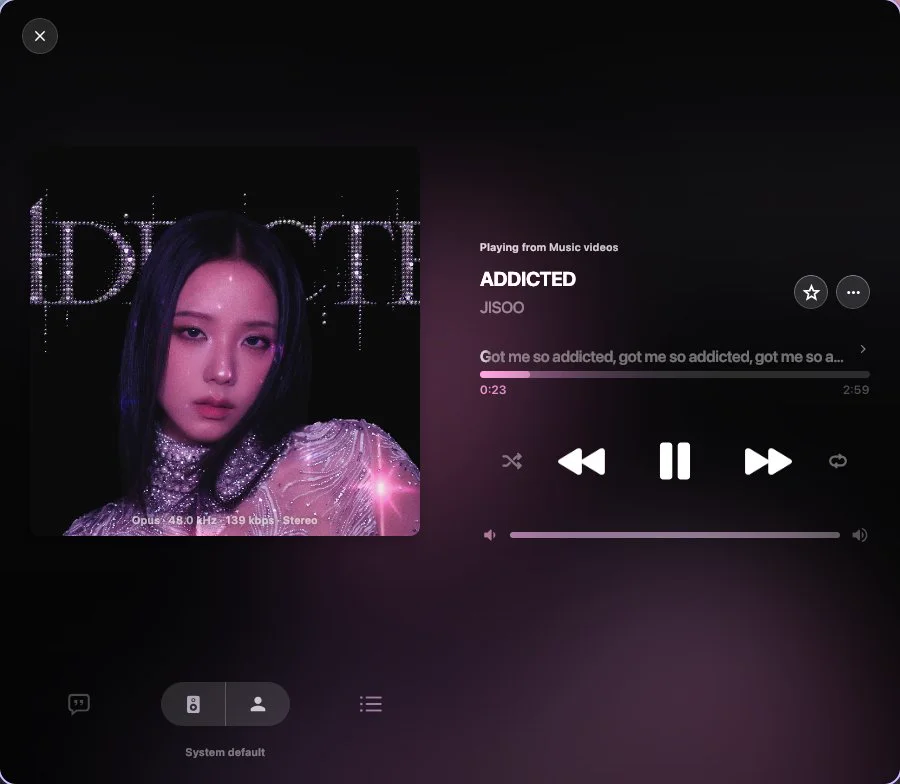
Choose the installer for your operating system.
AppImage, DEB, RPM, or Tar.gz
Setup EXE, MSI, or Portable ZIP
Looking for complete release notes or checksum files? View all releases on GitHub.
Harmonizing modern Apple Music aesthetics with desktop-grade audio performance.
Translucent liquid glass acrylics, dynamic color extraction from album artwork, interactive timeline scrubber with time preview, and auto-scrolling marquee text.
Hardware-accelerated JavaCPP decoding pipeline with 32-bit float internal precision. Supports lossless Hi-Res (FLAC, ALAC, WAV) and web Opus/AAC streaming.
Synchronize playback with friends worldwide in real-time. Instant connection via built-in cloud server, self-hosted VPS, or local one-click Cloudflare Quick Tunnel.
Frame-rate accurate syllable-by-syllable synchronized lyrics (LRCLIB, Musixmatch, YouTube) paired with smooth, low-CPU Apple Music motion canvas artwork.
Full Linux MPRIS D-Bus and Windows SMTC support across volume overlays and lock screens, plus zero-config local Discord Rich Presence via IPC.
Seamless track transitions with beat and tempo matching powered by Aubio and ONNX neural analysis models, alongside real-time local audio directory watching.
Follow the steps for your operating system. Up and running in seconds.
Universal AppImage (Recommended): Make executable with chmod +x and run directly:
chmod +x BitChord-*-x86_64.AppImage && ./BitChord-*-x86_64.AppImage
Debian / Ubuntu / Mint (.deb): Install native package via terminal:
sudo apt install ./bitchord_*_amd64.deb
Fedora / RHEL / openSUSE (.rpm): Install RPM package:
sudo dnf install ./bitchord-*.x86_64.rpm
Portable Tar.gz: Extract archive and launch directly:
./BitChord/bin/BitChord or register desktop launcher via ./scripts/install-desktop.sh
Setup Installer EXE (Recommended): Run BitChord-*.exe to install with automatic Start Menu and Desktop shortcuts. Java runtime is fully embedded.
Windows MSI Installer: Run BitChord-*.msi for standard Windows Installer system deployment.
Portable ZIP: Extract the ZIP archive anywhere, then double-click BitChord.vbs to launch the player silently in the background without terminal windows.